
Summary & Key Takeaways
- —Standard dimension is 1280 x 720 pixels (16:9 aspect ratio) with a strict 2MB file limit.
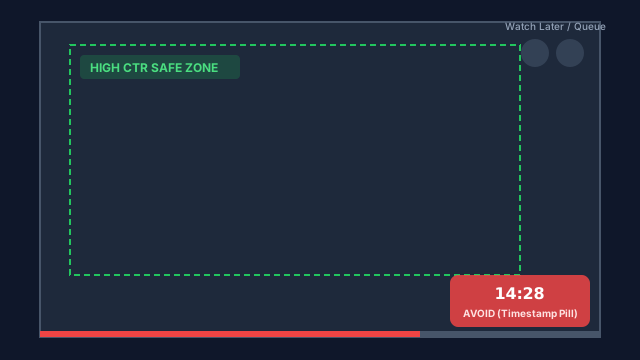
- —The bottom-right corner is a total dead zone occupied by video duration timestamps on both desktop and mobile apps.
- —The bottom 15% edge is frequently occluded by red watch-progress bars in user feeds.
- —High contrast text placed in the upper-left or center-left yields the highest click-through rates across mobile screens.
The Anatomy of a High-CTR YouTube Thumbnail
Over 70% of YouTube video views originate on mobile devices (Android and iOS). In the mobile feed, thumbnails are displayed at small physical sizes alongside video titles, channel icons, and view counts.
One of the most frequent mistakes creators make is designing thumbnails on high-resolution 27-inch desktop monitors without checking how critical visual elements appear once YouTube applies its native UI overlays.
The Four Dangerous UI Zones to Avoid
YouTube overlays dynamic UI badges across your thumbnail depending on platform and user state. Any text, face, or focal point inside these zones will be covered:
- •Bottom-Right Timestamp Zone: YouTube displays video runtime (e.g. "14:28") in a solid black pill (approx 180x50 pixels on canvas). Never place text or expressions here.
- •Bottom Red Progress Bar: When returning viewers see your video, a red playback progress bar spans the entire bottom 12 pixels.
- •Top-Right Action Badges: On desktop mouse-hover, "Watch Later" and "Add to Queue" icons pop up in the upper right.
- •Left & Right Edge Crop on TVs: Certain smart TV and short-form video previews apply a slight 5% bleed margin around the outer edges.
Optimal Technical Specifications for 2026
Ensure your design pipeline adheres to these technical baselines before exporting:
| Property | Recommended Value | Acceptable Minimum | Why It Matters |
|---|---|---|---|
| Dimensions | 1280 x 720 pixels | 640 x 360 pixels | Standard 16:9 canvas for crisp Retina rendering |
| Aspect Ratio | 16:9 | 16:9 | Required to avoid black letterboxing |
| Max File Size | 2 MB (2,048 KB) | None | YouTube rejects files larger than 2MB |
| Image Format | JPG or WebP | PNG (often exceeds 2MB) | Ensures fast CDN streaming and small file weight |
| Color Space | sRGB | sRGB | Ensures accurate color across OLED and LCD displays |
Actionable Workflow: Design, Compress, and Tag
To maximize impressions and click-through rates on your next video:
1. Design your artwork in 1280x720 with high-contrast text placed in the upper-left quadrant.
2. If your PNG export exceeds YouTube 2MB cap, drop it into the God of Tools Image Compressor to compress it to 800KB with zero visible compression artifacts.
3. Generate high-intent search tags using our YouTube Tag Generator to ensure search algorithms categorize your topic accurately alongside your optimized thumbnail.
Related In-Browser Tools
Zero-upload client-side utilities directly relevant to this guide.
YouTube Tag & Hashtag Generator
Generate comma-separated video tags within YouTube's 500-character limit, extract hashtags, and format keyword variations.
Image Resizer
Resize images to exact pixel dimensions, percentage scales, or social media & web presets with aspect ratio lock.
Color Picker
Visual color picker with HEX, RGB, HSL, CMYK values, color history, and instant copy.
Frequently Asked Questions
Should I upload PNG or JPG for YouTube thumbnails?
JPG or WebP is recommended. While PNG offers lossless quality, it often exceeds YouTube strict 2MB limit. A high-quality JPG at 1280x720 is virtually indistinguishable and stays well under 1MB.
Does thumbnail resolution impact SEO ranking?
Indirectly, yes. Thumbnails with clear typography and safe-zone adherence earn higher click-through rates (CTR), which is a primary ranking signal in the YouTube recommendation algorithm.